IESCO Bill Check Online
IESCO — the Islamabad Electric Supply Company — supplies electricity to Islamabad, Rawalpindi, Attock, Jhelum and Chakwal. Whether you live in an Islamabad sector, a Rawalpindi mohalla or a Chakwal village, you can check your IESCO bill online in under a minute using the 14-digit reference number printed on any previous bill. Your bill opens on the official PITC portal, showing the payable amount, due date and units consumed — particularly useful for tenants and landlords in the twin cities, who often need to confirm that a bill has been paid before it is due.
Check Your IESCO Bill
Enter your 14-digit reference number below and press the button. You will be taken to the official IESCO bill page on the PITC portal, where you can view, download and print your current bill. This website does not collect or store your reference number.
Your number is only used to open the official portal. Nothing is saved on this website.
Where Is the Reference Number on an IESCO Bill?
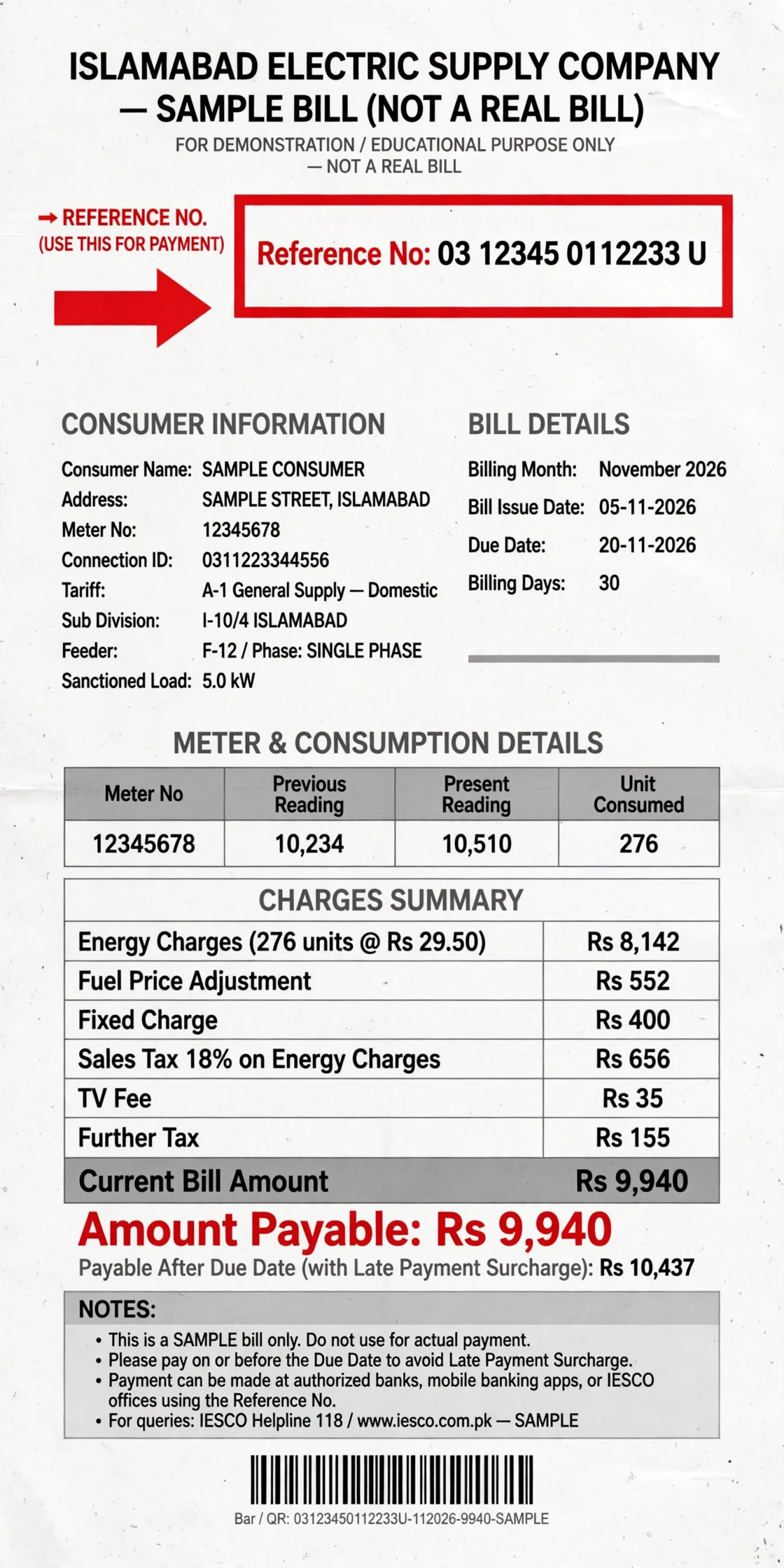
The reference number is printed near the top of every IESCO bill, labelled “Reference No”. It has 14 digits, often ending in U (urban) or R (rural): the first 2 digits are your billing batch, the next 5 your sub-division code, and the last 7 identify your connection. One IESCO-specific point: IESCO has renumbered connections in the past, and its own website offers a reference-number search to find a new number from an old one — so if a very old reference number is rejected, check for an updated number before assuming the portal is at fault. Do not confuse the reference number with the meter number stamped on the meter.
How to Check Your IESCO Bill — Step by Step
- Take any old IESCO bill and note the 14-digit reference number near the top.
- Enter it in the box above and press the button — the official IESCO page on the PITC portal opens.
- Confirm the reference number on the portal and submit. Your current bill loads on screen.
- Check the amount payable within the due date, the amount after the due date, and this month’s units.
- Print the bill or save the PDF — this duplicate is valid for payment and as an address proof.
IESCO Duplicate Bill
The bill on the portal is the official bill itself. Print it or save the PDF and pay at any bank branch, post office, Easypaisa or JazzCash agent — no stamp is required. In Islamabad and Rawalpindi, landlords commonly ask tenants for the paid IESCO bill each month, and the portal PDF with its payment stamp from the bank or wallet app is the simplest proof to share.
Check Your IESCO Bill by SMS
Without internet, send “PITC” followed by a space and your 14-digit reference number to 8118. You will receive a reply with your current bill amount and due date. Standard SMS charges apply.
How to Pay Your IESCO Bill
Pay through any bank’s mobile app or ATM, Easypaisa, JazzCash, or over the counter at a bank branch, post office or authorised payment shop. Pay the “within due date” amount before the printed due date; after it, the higher amount including the late payment surcharge applies, and continued delay can lead to disconnection.
IESCO Areas and Helpline
IESCO covers the Islamabad Capital Territory and the Rawalpindi, Attock, Jhelum and Chakwal districts. For billing or supply complaints call 118, the nationwide electricity helpline, or visit your IESCO sub-division office — its code is the middle five digits of your reference number. If your reading looks wrong, photograph the meter with the date visible and complain before the due date.
Frequently Asked Questions
How can I check my IESCO bill online?
Enter your 14-digit reference number in the checker above. It opens your bill on the official PITC portal (bill.pitc.com.pk/iescobill) with the amount, due date and units consumed.
Can I check my IESCO bill by CNIC or name?
No. An IESCO bill can only be retrieved by its reference number (the portal also accepts the Customer ID printed on the bill). No genuine service shows a bill by CNIC, name or address alone.
My old IESCO reference number is not working. Why?
IESCO has renumbered some connections, so a very old number may have been replaced. IESCO’s website offers a reference-number search to find the new number from the old one; you can also call 118 or visit your sub-division office.
Is the online IESCO bill valid for payment?
Yes. The portal bill is the official bill, and its printout or PDF is accepted as a duplicate bill at banks, post offices and mobile wallet agents.
When does the new IESCO bill appear online?
After meter reading in your area, usually a few days before the paper bill arrives. Until the new bill is issued, the previous month’s bill remains visible on the portal.
Other Electricity Companies
Not an IESCO consumer? Check your LESCO bill (Lahore region) or MEPCO bill (Multan and South Punjab), estimate any bill with our electricity bill calculator, or see current per-unit rates on our unit price page. Every company is listed on our homepage.