LESCO Bill Check Online
LESCO — the Lahore Electric Supply Company — supplies electricity to Lahore, Kasur, Okara, Sheikhupura and Nankana Sahib, serving more than five million consumers. If your home, shop or factory is in the LESCO region, you can check your LESCO bill online in less than a minute using the 14-digit reference number printed on any of your previous bills. Your bill opens on the official PITC portal — the same government portal used by all WAPDA distribution companies — showing your payable amount, due date and units consumed.
Check Your LESCO Bill
Enter your 14-digit reference number below and press the button. You will be taken to the official LESCO bill page on the PITC portal, where you can view, download and print your current bill. This website does not collect or store your reference number.
Where Is the Reference Number on a LESCO Bill?
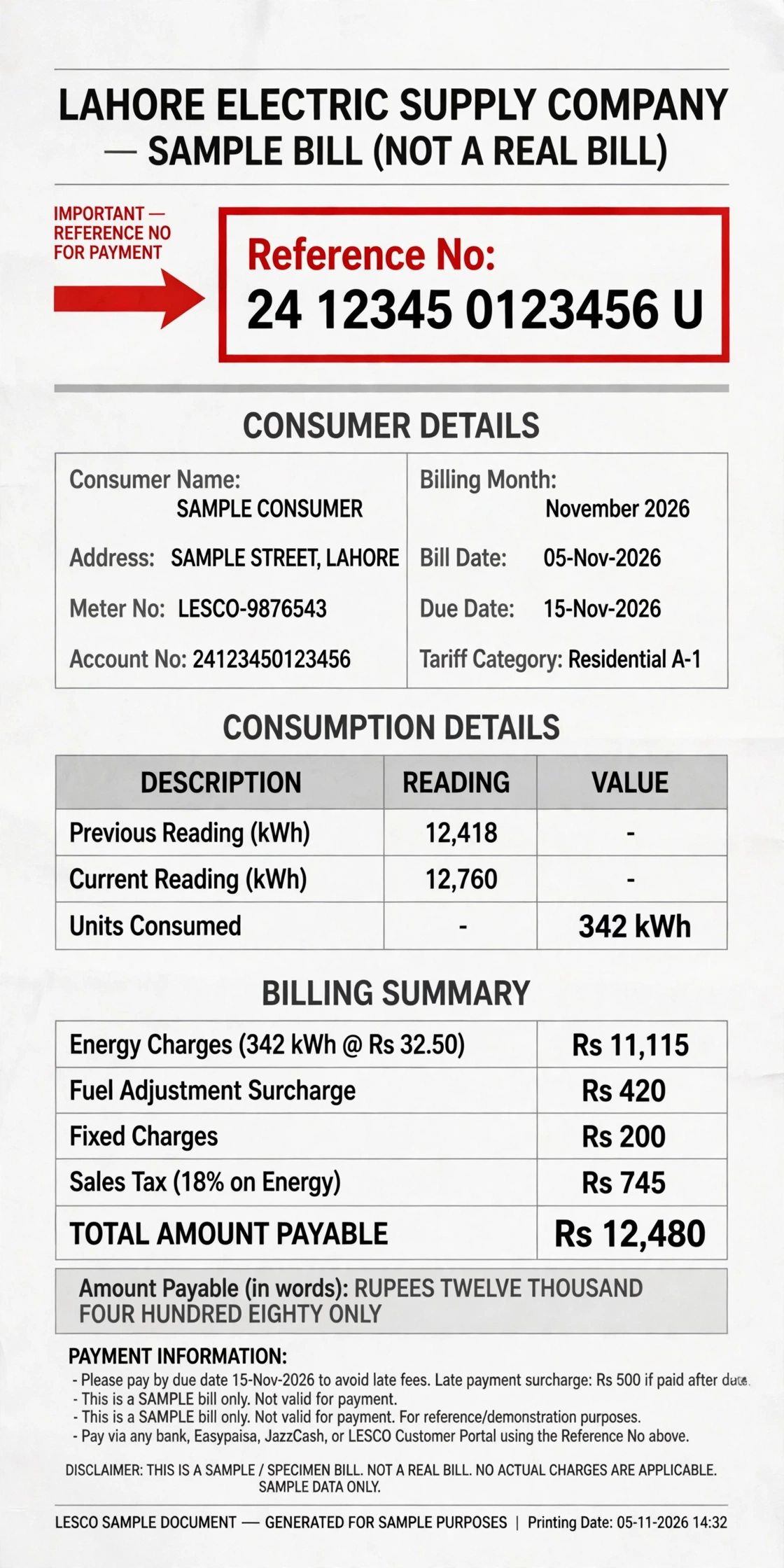
The reference number is printed near the top of every LESCO bill, labelled “Reference No”. It has 14 digits and often ends with the letter U (urban) or R (rural). The number is built in three parts: the first 2 digits are your billing batch, the next 5 digits are your sub-division code, and the last 7 digits identify your connection. Do not confuse it with your meter number, which is stamped on the meter itself, or with your Customer ID — the portal’s reference-number field needs these 14 digits.
How to Check Your LESCO Bill — Step by Step
- Take any old LESCO bill and note the 14-digit reference number near the top.
- Enter it in the box above and press the button — the official LESCO page on the PITC portal opens.
- On the portal, confirm your reference number and submit. Your current bill loads on screen.
- Read the amount payable within the due date, the (higher) amount payable after the due date, the due date itself, and the units consumed this month.
- Use the portal’s print option to download the bill as a PDF or print it directly. This printout is your duplicate bill.
Understanding Your LESCO Bill: Every Charge Explained
A LESCO bill is more than one number. Reading it line by line tells you exactly what you are paying for — and helps you spot a wrong bill before you pay it. These are the charges printed on a typical domestic bill:
- Units consumed and tariff: Your meter readings (previous and current) give the units used this month. The energy charge is these units multiplied by the per-unit rate of your tariff slab — the more units you use, the higher the slab, and the higher the rate applied.
- Fuel Price Adjustment (FPA): Electricity in Pakistan is partly generated from imported fuel, so when fuel prices change, the difference appears on bills a couple of months later as FPA — an extra charge per unit in expensive months, or a relief in cheaper ones. This is why two months with identical units can have different totals.
- Quarterly tariff adjustment: A smaller per-unit adjustment, revised every few months, which can also move your total up or down.
- Fixed charges: A monthly amount based on your sanctioned load or tariff category, payable even if you consume very few units.
- Sales tax (GST): Charged on the value of the electricity supplied, calculated as shown on the bill.
- Electricity duty: A provincial levy, calculated as a percentage of the energy cost.
- TV licence fee: A small fixed fee (Rs 35 on most domestic bills) collected with the electricity bill.
- Neelum Jhelum surcharge: A few paisa per unit that contribute to the Neelum Jhelum hydropower project.
- Income tax (for some consumers): If a monthly bill crosses the threshold set under the income tax law, an advance income tax is added for consumers who are not on the Active Taxpayer List — one practical reason high-usage households benefit from being tax filers.
Below these charges, the bill prints two totals: the amount payable within the due date and the higher amount payable after it. The difference is the late payment surcharge, so the due date is the single most valuable line on the page after the total itself.
LESCO Duplicate Bill
Lost this month’s paper bill? The bill you see on the portal is the official bill itself, not a summary. Print it or save the PDF and pay it at any bank branch, post office, Easypaisa or JazzCash agent — a duplicate printout is accepted everywhere and needs no stamp or signature. Many people in Lahore also keep the PDF on their phone as proof of payment for tenancy, visa and loan applications, where a recent utility bill is commonly requested as an address proof.
Check Your LESCO Bill by SMS
Without internet, you can still get your bill amount by SMS: send “PITC” followed by a space and your 14-digit reference number to 8118. You will receive a reply with your current bill amount and due date. Standard SMS charges apply.
How to Pay Your LESCO Bill
You can pay the amount shown on your bill through any bank’s mobile app or ATM, Easypaisa, JazzCash, Daraz Wallet, or over the counter at any bank branch, post office or authorised payment shop. Always pay the “within due date” amount before the due date printed on the bill; after that date the higher “after due date” amount — which includes the late payment surcharge — becomes payable, and continued delay can lead to disconnection.
Protected Consumers: Why the 200-Unit Mark Matters
Pakistan’s tariff gives cheaper rates to small domestic consumers. Households whose consumption stays at or below 200 units in a month fall into the “protected” category and pay the lowest slab rates; above that, “non-protected” rates apply and the per-unit price rises with each slab. The catch that surprises many Lahore households every summer: the rate is not applied unit-by-unit like a staircase you climb once — crossing into a higher slab raises the rate on your consumption as a whole, so a bill can jump sharply when air-conditioners and coolers push usage from, say, 190 units to 260. Checking your bill online as soon as it is issued — rather than when the paper copy arrives — gives you time to plan payment and, next month, to watch the meter before the slab does the damage.
Paying a LESCO Bill in Installments, and Arrears
If a bill is genuinely beyond your means in one month — after a wedding, a medical emergency or a summer spike — LESCO can allow the bill to be paid in installments. This is not available online: visit your sub-division office or a LESCO customer service centre with your bill and CNIC and request an installment plan before the due date. Unpaid amounts do not disappear; they carry forward as arrears on the next bill, with the late surcharge applied, and a connection with continuing arrears can be disconnected. If arrears shown on your bill relate to a disputed reading, raise the dispute first (see the complaint steps on this page) rather than paying under protest without a record.
New Connection, Name Change and Meter Problems
For a new LESCO connection, applications are taken through the electricity new-connection system used by the distribution companies, or at your sub-division office with your CNIC, proof of ownership or tenancy, and a neighbouring consumer’s bill for reference; a demand notice is issued after survey, and the meter is installed after payment. To transfer a connection into your own name after buying a house, apply at the sub-division office with the registry or sale deed, your CNIC and the last paid bill — keeping the old owner’s name on the bill is a common cause of disputes later. If your meter runs fast, stops, or its display is burnt, report it on 118 and in writing at the sub-division office; bills on a defective meter are supposed to be issued on an assessment basis until the meter is replaced, and your complaint number is your proof of the reporting date.
LESCO Areas and Helpline
LESCO covers Lahore, Kasur, Okara, Sheikhupura and Nankana Sahib districts. For complaints about billing, meter reading or supply, call 118 — the nationwide electricity complaint helpline — or visit your LESCO sub-division office, whose code is the middle five digits of your reference number. If your bill seems wrong (for example, units far above your normal usage), note your meter reading with a dated photo of the meter and lodge the complaint before the due date.
Frequently Asked Questions
How can I check my LESCO bill online?
Enter your 14-digit reference number in the checker above. It opens your bill on the official PITC portal (bill.pitc.com.pk/lescobill) with the amount, due date and units.
Can I check my LESCO bill by CNIC or by name?
No. LESCO bills can only be retrieved by reference number (the PITC portal also accepts the Customer ID printed on the bill). No genuine service shows a bill by CNIC, name or address alone.
My new LESCO bill is not showing. Why?
New bills appear after meter reading in your area. Until then, the previous month’s bill stays visible. If the portal shows an error at peak hours near the due date, wait and try again, or use the SMS method above.
Is the online LESCO bill valid for payment?
Yes. The portal bill is the official bill. A printout or PDF of it is accepted at banks, post offices and mobile wallet agents as a duplicate bill.
What if my LESCO bill amount looks wrong?
Compare the meter reading printed on the bill with your actual meter. If they differ, photograph the meter and complain on 118 or at your sub-division office before paying, so the bill can be corrected.
I did not receive my LESCO paper bill this month. What should I do?
You do not need the paper bill. Check the bill online on this page with your reference number, download the PDF, and pay it before the due date — the duplicate is accepted everywhere. If paper bills repeatedly fail to arrive, inform your sub-division office, because the reference number on an old bill is all you need every month.
The name or address on my LESCO bill is wrong. Can it be corrected?
Yes. Visit your sub-division office with your CNIC and proof of ownership or tenancy and apply for the correction or name transfer. Until it is done, keep paying the bill on time — a wrong name does not stop the late surcharge or disconnection.
Can I check my LESCO bill history for previous months?
The PITC portal shows your current bill. For older months, mobile banking and wallet apps such as Easypaisa and JazzCash show your payment history for bills you paid through them, and your sub-division office can provide a billing history statement on request.
Other Electricity Companies
Not a LESCO consumer? Check your bill for MEPCO (Multan and South Punjab) or IESCO (Islamabad and Rawalpindi), estimate any company’s bill with our electricity bill calculator, or see the current per-unit rates on our unit price page. All companies are listed on our homepage.